Just to the left of the counter switches is a "not" switch labelled
not = , which negates the conditions.

means not (Q = x and Q2 = .) : this allows Q1 = . , Q2 = x , or Q1 = x, Q2 = x,
or Q1 = . , Q2 = .
At the foot of each column of ten counter switches is another "not"
switch, which negates the whole column.
For example: to impose Q = either / or 5
This is equivalent to not (Q not = / and not = 5)
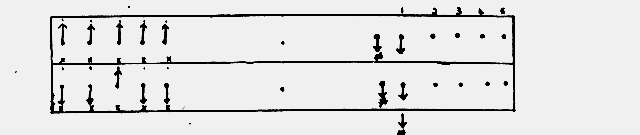
(e) Addition Switches
In a row in the lower part of the Q panel the 5 switches at the left
which are separated by + signs. can be thrown down only, to make the sum of any
number of impulses a dot. There are five counter switches exactly as in the
upper part of the panel. The "not" switch is labelled x dot , but it has the same
effect.
Footnote: Clearly not( i + j = . ) is the same as ( i + j = x). These "not"
switches actually have a neutral position, but it is not needed and is not alike
on all Colossi: on some it causes no condition to be imposed, on others an
impossible condition.
The five "not" switches at the bottom of the Q panel labelled not =
negate whole columns, not merely the lower part of the panel; in particular they
negate the upper row of "not" switches.
(f) Examples of Switching
It is worthy of emphasis that what is switched is Q, and that Q is
whatever is selected by big black switches. In runs to set X's, Q is Delta-Z +
Delta-X (though if Delta'd X patterns are set up it is Delta-Z + X so far as
Colossus is concerned); in runs to set PSI's it is usually Z + X + PSI . Use has
been made of Q as X ,Z , Z + X, Delta-Z + Delta-X + Delta-PSI. The methods of
switching on the Q panel are the same in all cases.
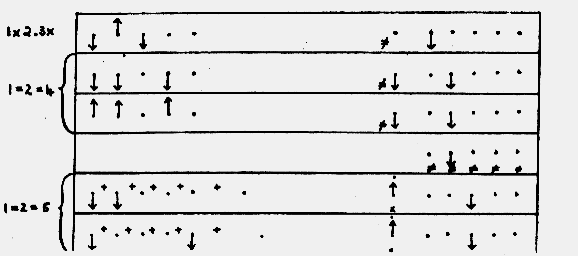
(i) 3x/1x2., 4 = /1=2, 5=/1=2 simultaneously on counters 1,2,3 The two runs
4=/1=2, 5=/1=2 would ordinarily be done on the same principle: here, for purposes
of demonstration, they are done quite differently.
| previous page | next page | index page |
