|
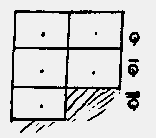
in each column any impulse plugged into Q
appears one back in Q bar and, in the left-hand column
two back in Q double bar
The notation Q is unfortunate: it is not analogous to Q on Colossus.
I would be better. |
(h) Plugging into the switch panel.
The output of an ordinary addition field, or of any special facility may be
plugged into the switch panel where the conditions, a count for which is to be
made, can be imposed.
An impulse plugged into one of the 10 jacks in the bottom row of the switch
panel appears on two switches, one labelled x dot, and, immediately below this,
one labelled + . The first five jacks correspond to the five pairs of switches aa
, the second five to those of bb. The impulses are called (not written on
machine) Q1,Q2,Q3,Q4,Q5,Q6,Q7,Q8,Q9,Q10.
Footnote: These are not related to Q,Q bar,Q double bar: they(i.e.Q1,Q2 etc.) are
broadly analogous to Q on Colossus, but the impulses plugged into them are quite
arbitrary.
The five flacks marked "direct plug" in the diagram have essentially the
same function, but are permanently switched to dot.
54E THE SWITCH PANEL
(a) Layout
Without the diagram at the end of this volume, this description will
probably be completely obscure; Fig 58(vii).
(b) Q Switches
The two rows of switches in the left half of the switch panel will be
described first: the conditions they impose may be modified (may even be reversed)
by the switches in the right half.
The switches to the left of aa control impulses Q1,Q2,Q3,Q4,Q5.
The switches to the left of bb control impulses Q6,Q7,Q8,Q9,Q10.
A switch labelled X dot can be thrown either to make its impulse a dot or to
make its impulse a cross.
If several are thrown, all their conditions are imposed.
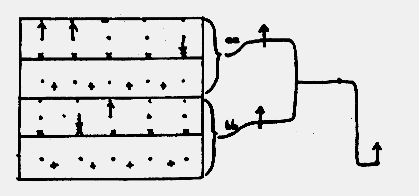 |
Imposes the conditions
Q1 = . Q2 = . Q5 = x
Q7 = x Q8 = .
|
| previous page | next page | index page |
